> ## Documentation Index
> Fetch the complete documentation index at: https://dripart-matt-router-pricing-pika-and-guard.mintlify.site/llms.txt
> Use this file to discover all available pages before exploring further.
# TripoSplat 图片转高斯泼溅 ComfyUI 工作流示例
> 使用 TripoSplat 从单张 2D 图片生成高质量 3D 高斯泼溅表示,支持可控密度和渲染预算。
**TripoSplat** 是一款开源模型,能够直接从单张 2D 图像生成 **3D 高斯泼溅(Gaussian splat)** 表示。它由 VAST-AI 开发,并以开源许可证发布。
与需要多视角输入或以网格作为主要输出的传统 3D 重建方法不同,TripoSplat 创建 **高斯泼溅** 表示:这是一种渲染技术,将数千个带颜色的 3D 高斯体分布在空间中来表示场景。这种方法可以实现快速、高质量的渲染,并支持可控的密度和预算。
TripoSplat:图像转高斯泼溅
上传单张 2D 图像,即可生成高质量的 3D 高斯泼溅表示,并以可控的密度和预算进行渲染。
 请确保你的 ComfyUI 已经更新。
* [ComfyUI 下载](https://www.comfy.org/download)
* [ComfyUI 更新教程](/zh/installation/update_comfyui)
本指南里的工作流可以在[工作流模板](/zh/interface/features/template)中找到。如果找不到,可能是 ComfyUI 没有更新。
如果加载工作流时有节点缺失,可能原因有:
1. 你用的不是最新版(每夜版)。
2. 启动时有些节点导入失败。
* [Cloud](https://cloud.comfy.org) 会在 ComfyUI 稳定版本发布后更新。
所以,如果你发现本文档中有任何核心节点缺失,可能是因为新核心节点尚未在最新稳定版中发布。请等待下一个稳定版发布。
在 Comfy Cloud 上立即运行此工作流
下载 JSON,或在模板库中搜索“TripoSplat:图像转高斯泼溅”
**输入素材**
上传此文件到对应的 `LoadImage` 节点:
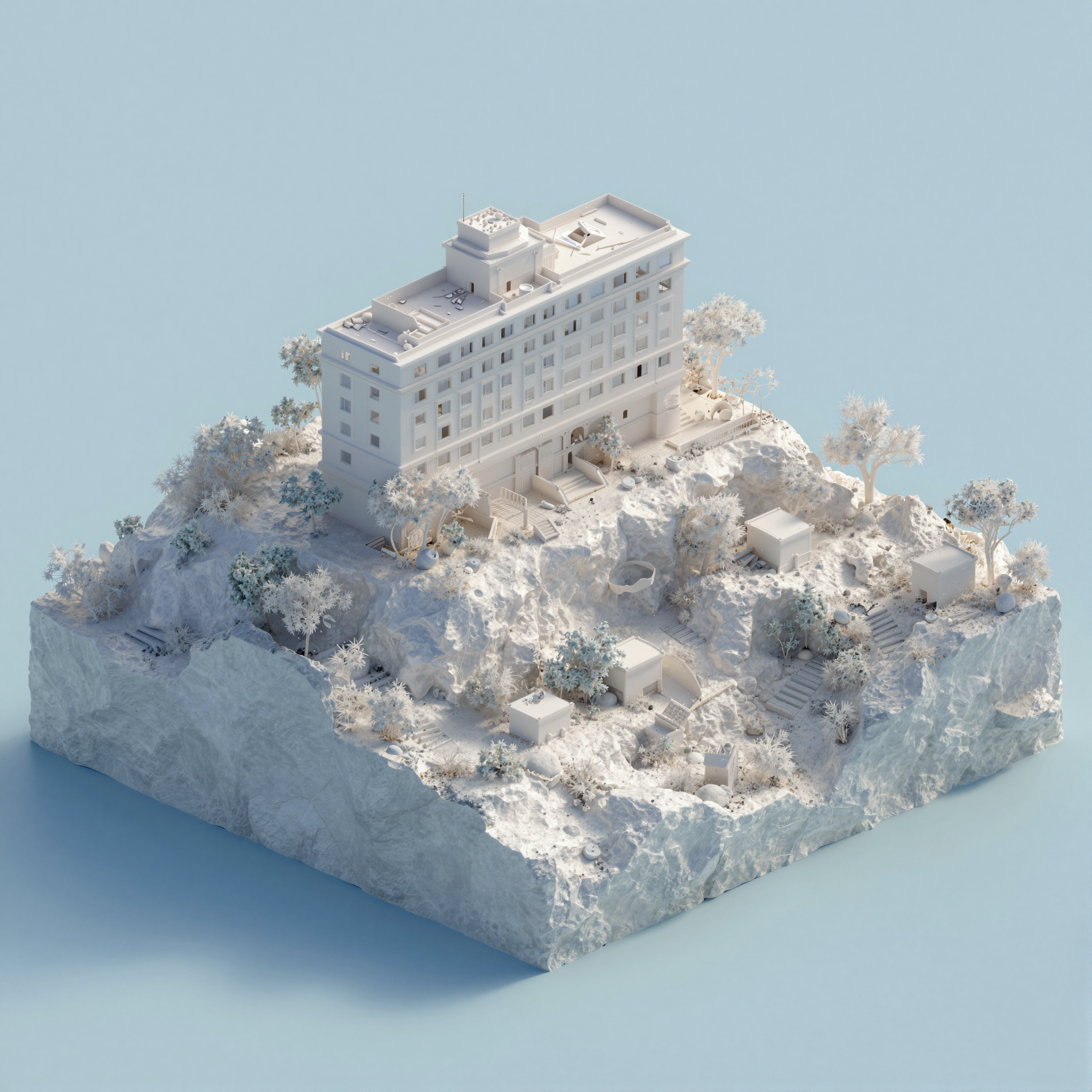
`LoadImage` 节点 99 · `white-hotel-on-rocky-island.png`
## 工作原理
TripoSplat 使用 **前馈架构**,接收单张 RGB 图像并直接预测一组 3D 高斯基元。流程包括:
1. **图像编码** — 输入图像由视觉编码器(DINOv2)处理
2. **三平面生成** — 特征解码为三平面表示
3. **高斯预测** — 采样三平面以生成高斯参数(位置、缩放、旋转、不透明度、颜色)
4. **渲染** — 通过可微分泼溅从任意视角渲染高斯体
本工作流使用子图节点进行模块化处理。查看子图文档了解如何自定义和扩展工作流。
## 工作流节点指南
### LoadImage
* 加载输入图片(PNG/JPG)
* 示例图片:`white-hotel-on-rocky-island.png`(可在模板库中获取)
### TripoSplat(子图)
主处理子图节点,接收图片并生成 3D 高斯泼溅。暴露的参数:
| 参数 | 默认值 | 说明 |
| - | - | - |
| `switch` | — | 启用/禁用子图 |
| `num_gaussians` | — | 生成的高斯基元数量(控制质量/性能) |
| `seed` | — | 随机种子,用于结果复现 |
| `unet_name` | — | TripoSplat 扩散模型检查点 |
| `clip_name` | — | CLIP 视觉编码器模型 |
| `vae_name` | — | 用于编码/解码的 VAE 模型(两个:一个为主 VAE,一个为编码器) |
| `bg_removal_name` | — | 背景去除模型 |
### CreateCameraInfo
* 定义渲染结果的相机轨道
* 参数:轨道类型、角度、距离、视野等
* 默认:35° 仰角、距离 30、缩放 2.5
### RenderSplat
* 从定义的相机角度将高斯泼溅渲染为 2D 图像
* 参数:输出分辨率(默认 1024×1024)、图像质量设置
### SplatToMesh
* 将高斯泼溅转换为网格(可选)
* 参数:网格密度、平滑度、简化程度
### SaveGLB
* 将结果保存为 GLB 3D 文件
### SaveVideo
* 保存渲染 3D 场景的视频
### SplatToFile3D
* 以 SPZ 格式导出高斯泼溅
### CreateVideo
* 从渲染帧创建视频
## 运行步骤
1. **加载图片** — 使用 **LoadImage** 节点加载一张 2D 图片
2. **运行 TripoSplat 子图** — 模型将生成高斯泼溅表示
3. **选择输出格式** — 导出为 GLB、SPZ、视频或渲染为网格
4. **查看结果** — 使用生成的 3D 文件或渲染预览
## 输出选项
| 节点 | 格式 | 用途 |
| - | - | - |
| **SaveGLB** | `.glb` | 标准 3D 文件格式,可导入 3D 软件 |
| **SplatToFile3D** | `.spz` | 压缩的高斯泼溅格式,高效存储 |
| **RenderSplat** | 2D 图像 | 从任意角度快速预览结果 |
| **SplatToMesh** | 网格 | 转换为传统网格以供进一步编辑 |
## 模型下载
下载 TripoSplat 模型及所需文件。放入对应的 `models/` 子目录。
triposplat\_fp16.safetensors — TripoSplat 扩散模型检查点
triposplat\_vae\_decoder\_fp16.safetensors — VAE 解码器
flux2-vae.safetensors — Flux.2 VAE,用于潜空间编码
dino\_v3\_vit\_h.safetensors — CLIP 视觉编码器(DINOv2)
birefnet.safetensors — 用于预处理的背景去除模型
### 模型存放位置
```
📂 ComfyUI/
├── 📂 models/
│ ├── 📂 diffusion_models/
│ │ └── triposplat_fp16.safetensors
│ ├── 📂 vae/
│ │ ├── triposplat_vae_decoder_fp16.safetensors
│ │ └── flux2-vae.safetensors
│ ├── 📂 clip_vision/
│ │ └── dino_v3_vit_h.safetensors
│ └── 📂 background_removal/
│ └── birefnet.safetensors
```
This documentation is built and hosted on [Mintlify](https://mintlify.com), a developer documentation platform.
请确保你的 ComfyUI 已经更新。
* [ComfyUI 下载](https://www.comfy.org/download)
* [ComfyUI 更新教程](/zh/installation/update_comfyui)
本指南里的工作流可以在[工作流模板](/zh/interface/features/template)中找到。如果找不到,可能是 ComfyUI 没有更新。
如果加载工作流时有节点缺失,可能原因有:
1. 你用的不是最新版(每夜版)。
2. 启动时有些节点导入失败。
* [Cloud](https://cloud.comfy.org) 会在 ComfyUI 稳定版本发布后更新。
所以,如果你发现本文档中有任何核心节点缺失,可能是因为新核心节点尚未在最新稳定版中发布。请等待下一个稳定版发布。
在 Comfy Cloud 上立即运行此工作流
下载 JSON,或在模板库中搜索“TripoSplat:图像转高斯泼溅”
**输入素材**
上传此文件到对应的 `LoadImage` 节点:
`LoadImage` 节点 99 · `white-hotel-on-rocky-island.png`
## 工作原理
TripoSplat 使用 **前馈架构**,接收单张 RGB 图像并直接预测一组 3D 高斯基元。流程包括:
1. **图像编码** — 输入图像由视觉编码器(DINOv2)处理
2. **三平面生成** — 特征解码为三平面表示
3. **高斯预测** — 采样三平面以生成高斯参数(位置、缩放、旋转、不透明度、颜色)
4. **渲染** — 通过可微分泼溅从任意视角渲染高斯体
本工作流使用子图节点进行模块化处理。查看子图文档了解如何自定义和扩展工作流。
## 工作流节点指南
### LoadImage
* 加载输入图片(PNG/JPG)
* 示例图片:`white-hotel-on-rocky-island.png`(可在模板库中获取)
### TripoSplat(子图)
主处理子图节点,接收图片并生成 3D 高斯泼溅。暴露的参数:
| 参数 | 默认值 | 说明 |
| - | - | - |
| `switch` | — | 启用/禁用子图 |
| `num_gaussians` | — | 生成的高斯基元数量(控制质量/性能) |
| `seed` | — | 随机种子,用于结果复现 |
| `unet_name` | — | TripoSplat 扩散模型检查点 |
| `clip_name` | — | CLIP 视觉编码器模型 |
| `vae_name` | — | 用于编码/解码的 VAE 模型(两个:一个为主 VAE,一个为编码器) |
| `bg_removal_name` | — | 背景去除模型 |
### CreateCameraInfo
* 定义渲染结果的相机轨道
* 参数:轨道类型、角度、距离、视野等
* 默认:35° 仰角、距离 30、缩放 2.5
### RenderSplat
* 从定义的相机角度将高斯泼溅渲染为 2D 图像
* 参数:输出分辨率(默认 1024×1024)、图像质量设置
### SplatToMesh
* 将高斯泼溅转换为网格(可选)
* 参数:网格密度、平滑度、简化程度
### SaveGLB
* 将结果保存为 GLB 3D 文件
### SaveVideo
* 保存渲染 3D 场景的视频
### SplatToFile3D
* 以 SPZ 格式导出高斯泼溅
### CreateVideo
* 从渲染帧创建视频
## 运行步骤
1. **加载图片** — 使用 **LoadImage** 节点加载一张 2D 图片
2. **运行 TripoSplat 子图** — 模型将生成高斯泼溅表示
3. **选择输出格式** — 导出为 GLB、SPZ、视频或渲染为网格
4. **查看结果** — 使用生成的 3D 文件或渲染预览
## 输出选项
| 节点 | 格式 | 用途 |
| - | - | - |
| **SaveGLB** | `.glb` | 标准 3D 文件格式,可导入 3D 软件 |
| **SplatToFile3D** | `.spz` | 压缩的高斯泼溅格式,高效存储 |
| **RenderSplat** | 2D 图像 | 从任意角度快速预览结果 |
| **SplatToMesh** | 网格 | 转换为传统网格以供进一步编辑 |
## 模型下载
下载 TripoSplat 模型及所需文件。放入对应的 `models/` 子目录。
triposplat\_fp16.safetensors — TripoSplat 扩散模型检查点
triposplat\_vae\_decoder\_fp16.safetensors — VAE 解码器
flux2-vae.safetensors — Flux.2 VAE,用于潜空间编码
dino\_v3\_vit\_h.safetensors — CLIP 视觉编码器(DINOv2)
birefnet.safetensors — 用于预处理的背景去除模型
### 模型存放位置
```
📂 ComfyUI/
├── 📂 models/
│ ├── 📂 diffusion_models/
│ │ └── triposplat_fp16.safetensors
│ ├── 📂 vae/
│ │ ├── triposplat_vae_decoder_fp16.safetensors
│ │ └── flux2-vae.safetensors
│ ├── 📂 clip_vision/
│ │ └── dino_v3_vit_h.safetensors
│ └── 📂 background_removal/
│ └── birefnet.safetensors
```
This documentation is built and hosted on [Mintlify](https://mintlify.com), a developer documentation platform.